
GCP $300 Free Credit in OpenCode: Run Gemini 3.8 Flash via Vertex AI

Yes, the GCP $300 free trial credit works for coding in OpenCode. The Google Cloud credit for new customers (valid for 90 days) covers Gemini usage on Agent Platform (formerly Vertex AI). Create an API key in Agent Studio, paste it into OpenCode’s Vertex provider, and you can run Gemini 3.8 Flash and other Gemini models. You are not charged automatically during the trial. Two exceptions: the credit does not pay for the Gemini API in AI Studio or for partner models such as Claude.
This guide covers the OpenCode setup and cost control, with facts checked on October 19, 2026. For eligibility, card verification and the full list of trial limits, see the Google Cloud $300 free trial guide. The screenshots come from a Traditional Chinese console, so labels appear in Chinese.
What the $300 credit covers for AI usage
| Use | Covered by the credit? | Source |
|---|---|---|
| Gemini models on Agent Platform (the route OpenCode uses) | Yes | Not excluded by Google; my billing report showed Vertex AI charges fully offset by credits |
| Gemini API in AI Studio | No | Google: the $300 credit can’t pay for Gemini API in AI Studio costs |
| Partner models offered as a managed API, such as Claude | No; Marketplace is also blocked during the trial | Same page |
| Quota increase requests | Not allowed during the trial | Same page |
| Google AI Pro’s $10 per month | A separate credit that stacks with the trial | Google blog |
In OpenCode, pick Gemini models only. Claude requires paid usage and a full (upgraded) billing account.
How many tokens $300 buys
Prices from the official Agent Platform pricing page (global endpoint, per 1M tokens):
| Model | Input / output | Cached input | $300 buys roughly |
|---|---|---|---|
| Gemini 3.8 / 3.7 Flash (introductory, through Dec 31, 2026) | $0.75 / $3.75 | $0.075 | 400M input or 80M output |
| Gemini 3.8 / 3.7 Flash (standard, from Jan 1, 2027) | $1.50 / $7.50 | $0.15 | 200M input or 40M output |
| Gemini 4 Argon (introductory, through Nov 30, 2026) | $2 / $10 | $0.10 | 150M input or 30M output |
- Google delivers the Flash introductory price as 50% credits back on net spend and does not say whether trial-credit spend qualifies. Budget with the standard price.
- A coding agent resends a large context on every turn, so input far outweighs output. Cached input costs one tenth of the regular rate, so real usage usually stretches further than the input price alone suggests.
Step 1: Confirm the credit is active
- Activate the Free Trial using the trial guide, then create a dedicated project (for example ai-coding-sandbox).
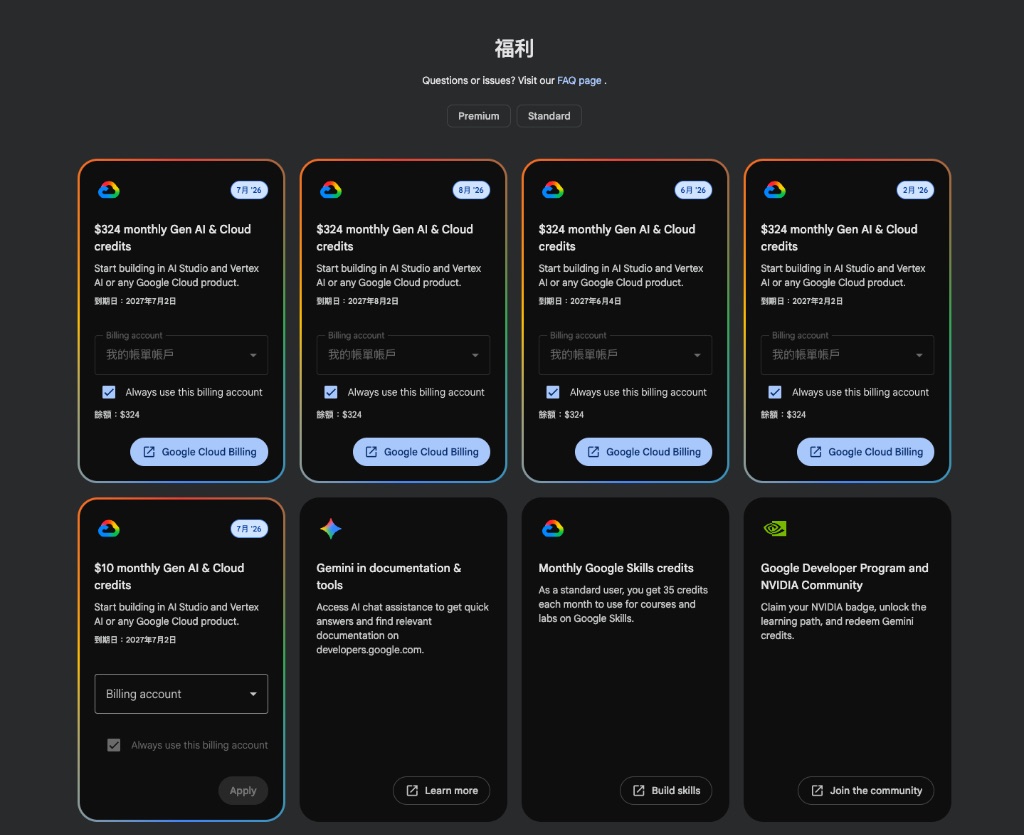
- Optional: if you subscribe to Google AI Pro, claim the monthly $10 Gen AI and Cloud credit on the Google Developer Program benefits page:
- Open Billing → Credits and check that both the $300 Free Trial credit and the monthly credit appear:

Step 2: Enable the Agent Platform API and create an API key
Vertex AI is now Gemini Enterprise Agent Platform, shortened to Agent Platform in the console, and the API is now the Agent Platform API.
- Search for and enable Agent Platform API in the console.
- Open the Agent Studio API keys page and create a key.
- Add an API restriction so the key only calls the Agent Platform API. Google warns that anyone holding the key can spend your quota. Google API key docs
An API key means no gcloud CLI and no service account. Google also offers express mode, a no-billing free tier (@gmail.com accounts only, 90 days, lower quotas). It is a separate program from the $300 trial, so don’t mix them up. Express mode overview
Step 3: Connect OpenCode to Vertex and pick a model
- In OpenCode, run /connect, choose Vertex, and paste the API key. An environment variable also works:
1 | export GOOGLE_VERTEX_API_KEY="your-api-key" |
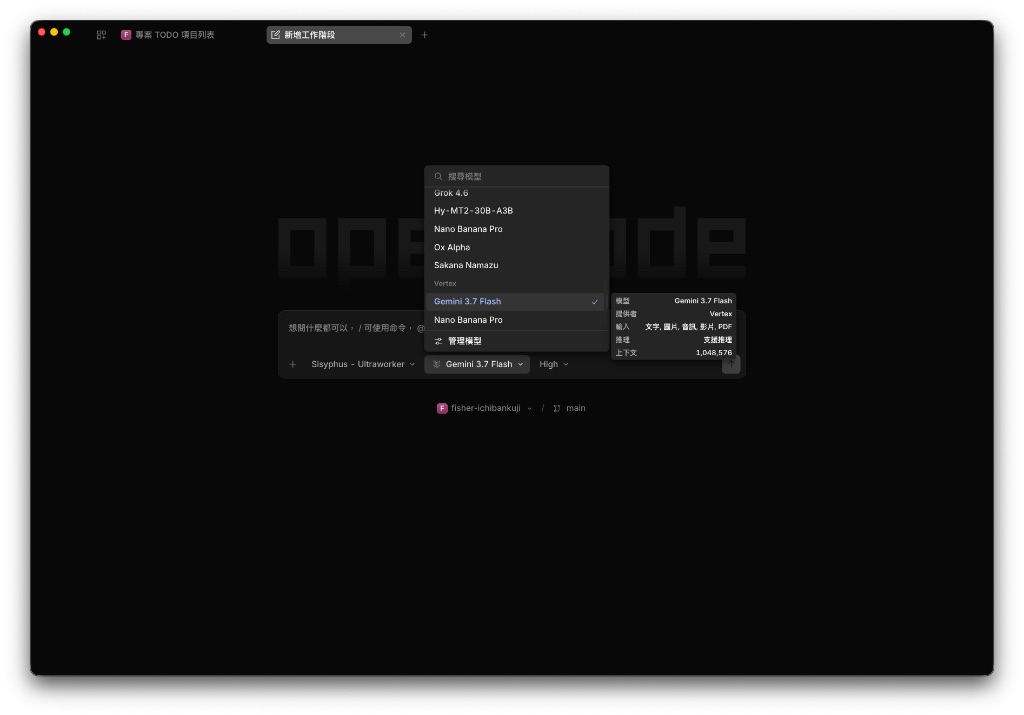
- Run /models and switch to Gemini 3.8 Flash.
This screenshot is from my August test with Gemini 3.7 Flash and shows the 1,048,576-token (1M) context window:
Which model to use:
| Model | Best for | Notes |
|---|---|---|
| Gemini 3.8 Flash | Everyday default | 1M context, up to 65,536 output tokens; thinking levels LOW, MEDIUM and HIGH only. Official specs; what’s new: Gemini 3.8 Flash overview |
| Gemini 3.7 Flash | Saving tokens | Same price; Google suggests 3.7 when compute efficiency matters most |
| Gemini 4 Argon | Hard, long tasks | About 2.7 times the Flash price, doubling again on Dec 1; see Gemini 4 Argon pricing and access |
If you get an authentication error, check whether project or region settings such as GOOGLE_CLOUD_PROJECT or VERTEX_LOCATION are also set. With an explicit project or region, OpenCode may use ADC (gcloud login) instead of the API key.
Monitor usage and avoid surprise bills
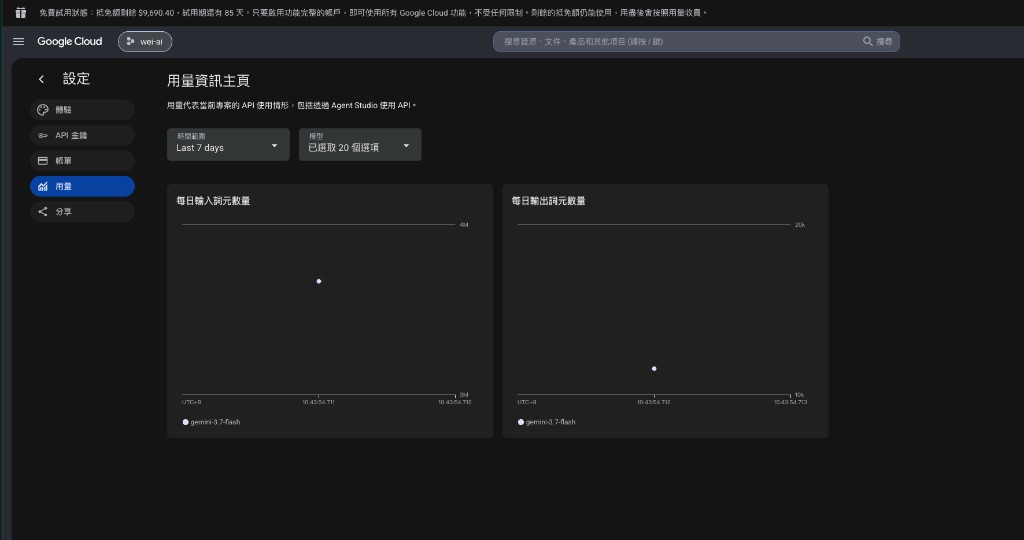
Token usage: the Agent Studio usage dashboard shows daily input and output tokens:
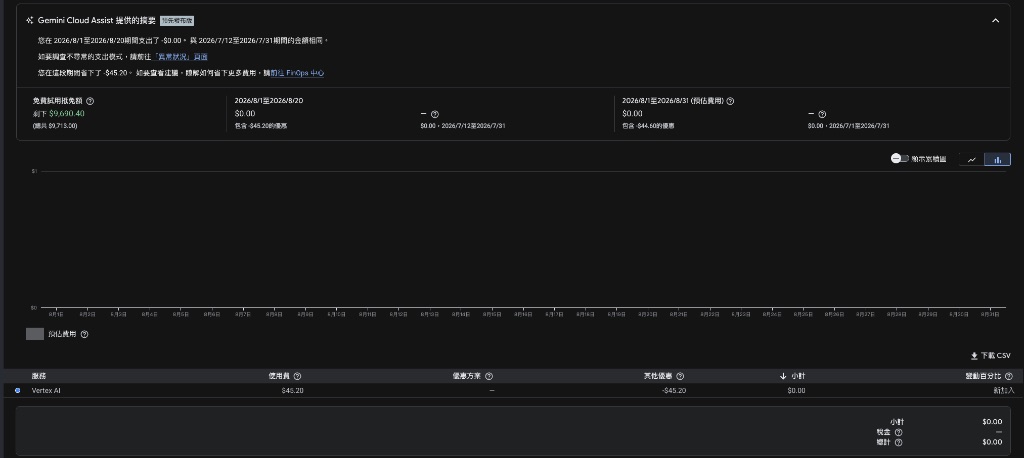
Credit offsets: in Billing → Reports, confirm that Vertex AI (Agent Platform) charges are fully offset by credits and the amount due is $0:
After upgrading to a paid account, set a budget under Billing → Budgets & alerts. A regular budget only sends alerts and doesn’t cap usage. For a hard limit, use a spend cap budget. It supports Agent Platform and pauses new requests in the project once spending passes the budget, until the next budget period. Spend cap docs
What happens after 90 days or when the credit runs out
Per the official Free Trial terms:
| Situation | Result |
|---|---|
| During the trial | No automatic charges |
| $300 spent or 90 days passed, whichever comes first | Billing is disabled and resources stop, so OpenCode’s API calls fail too; a 30-day grace period starts |
| No upgrade during the grace period | Resources created during the trial are permanently deleted |
| Upgrade to a paid account | Remaining credit stays until the original 90-day expiry; usage beyond it is billed |
If you’d rather not pay per token after the trial, compare flat-rate options in AI coding tool subscriptions compared.


