
Codex Usage Limits: Five-Hour Resets, Weekly Limits, and Credits

To check Codex usage and reset times, open Settings → Usage or run /status in the CLI. Check the five-hour and weekly windows separately before deciding whether to wait, use an available reset, or use credits.
The quick reference below separates these choices. The rest of the guide covers Codex and Claude Code usage, monitoring, and practical ways to reduce repeated work.
Quick Check: Five-Hour Limits, Weekly Limits, and Resets
| What to check | Where to look | What matters |
|---|---|---|
| Five-hour usage | The short window in Settings → Usage | Use the recovery time shown for that window |
| Weekly usage | The weekly window in the same dashboard | Short-window recovery does not restore weekly capacity |
| Banked reset | Your account’s manual reset options | Check eligibility, expiration, and the resulting reset schedule |
Open the Codex usage dashboard, or run /status in the CLI. OpenAI’s usage documentation points to these account-specific checks.
This guide uses the current OpenAI and Anthropic documentation as its baseline. Exact allowances, eligible models, promotions, and prices can change, so your own usage dashboard is the final authority.
Start With the Usage Dashboard
Before trying to predict a reset, inspect what your account actually reports.
For Codex, use /status in an active CLI session or open Settings → Usage in a supported Codex client. OpenAI says the dashboard can show which allowance is exhausted, an available credit balance, and a reset time when one applies.
For Claude Code, use /usage to inspect plan limits or /status for session and authentication details. Anthropic also exposes usage information in account settings. The message displayed when a subscription limit is reached normally includes the relevant reset time.
Avoid relying on a screenshot from another user. Limits vary by plan, account, workspace, model, task type, and current product rules.
Why One Task Can Consume More Than Another
Neither service can be understood as a fixed number of identical prompts. Usage depends on the work being performed.
Common factors include:
- the selected model and reasoning effort;
- how much conversation history is carried into each turn;
- the number and size of files the agent reads;
- whether the task runs locally or in an isolated cloud environment;
- tool calls, code review, browser work, and other agent capabilities;
- the duration and complexity of the task.
A request to rename one variable is not equivalent to an agent reading an entire repository, planning a migration, changing twenty files, and running a full test suite.
Claude Code Usage Limits
Claude usage depends on how Claude Code is authenticated.
Subscription Usage
When Claude Code is connected to a Claude subscription, its usage is shared with other Claude surfaces covered by that plan. Work performed on Claude web, desktop, and Claude Code can therefore draw from the same allowance.
Anthropic documents session-based usage windows and additional weekly limits for subscription plans. Max plans provide higher capacity than Pro, but they are not unlimited. The next reset time shown in Settings → Usage is more reliable than a generic estimate because it reflects the rules currently applied to your account.
API Billing
When Claude Code uses an API key, usage is pay-as-you-go rather than deducted from a Pro or Max subscription allowance. The /cost command can display spend for the current API-backed session.
Check whether ANTHROPIC_API_KEY is set in your environment. Anthropic warns that this can cause Claude Code to use API billing even when you also have a subscription. Authentication determines the billing path.
Usage Limit vs Context Limit
A usage limit controls how much work your account can perform during a period. A context limit controls how much information one conversation can hold. Reaching one is not the same as reaching the other.
Use /compact when you need to continue the same task but the conversation has become large. Use /clear when moving to an unrelated task. Clearing between unrelated tasks prevents old files and messages from being resent as part of every new turn.
Codex Usage Limits
Codex is available through ChatGPT plans, with usage that varies by plan. OpenAI advises users to inspect the current pricing page and usage dashboard rather than rely on a permanent prompt-count table.
Codex, ChatGPT Work, ChatGPT for Excel, and Workspace Agents can share an agentic allowance and credit pool when those features are available on the plan. A long Codex task can therefore affect the capacity available to another supported agentic surface.
When the included allowance is exhausted, your account may offer one or more of these choices:
- wait for the displayed automatic reset;
- apply an available banked reset;
- purchase or use credits;
- upgrade the plan.
The actual options depend on account eligibility, plan, workspace, and region.
When to Use a Banked Reset: The Weekly Clock and the 30-Day Deadline
A full banked reset restores five-hour and weekly capacity and moves your next weekly reset into a new, roughly seven-day cycle. Before redeeming one, check how close you are to your existing automatic reset. OpenAI explicitly says the weekly reset date changes; confirm the new time in Settings → Usage afterward.
For example, if your weekly allowance was due to recover on Monday and you redeem a reset on Sunday, do not continue planning around that old Monday reset. If the work can wait, saving the reset may be more useful. If Sunday delivery matters, account for the new weekly schedule.
This differs from Claude Pro’s regular weekly schedule, which uses a fixed day and time assigned to the account. Keep separate reset schedules when using both tools.
The reset’s expiration is a different clock. OpenAI’s published 30-day promotion terms count from when the reset is granted, not from redemption. They do not provide 30 days of unlimited use. Expiration can vary by offer, so check the date shown for the reset you received.
My timing rule is to compare time until automatic recovery, time until the reset expires, and upcoming workload. Wait when recovery is close and the task can wait. Redeem when immediate capacity is valuable. If expiration is approaching, schedule work you already need to do within that deadline.

Banked Resets and Paid Credits Are Different
Flexible usage credits extend supported agentic work after included usage has been consumed. They operate as pay-as-you-go capacity and draw from a credit balance.
A banked reset refreshes an eligible limit once. Credits pay for additional supported usage. Neither should be described as the other, and neither is the same as API credit unless the applicable offer explicitly says so.
When cost matters, check whether a client is about to use included allowance, purchased agentic credits, or a separate API account before starting a long task.
Monitor Claude and Codex With CodexBar
CodexBar is an open-source menu bar application that displays usage meters and reset countdowns for AI providers, including Claude and Codex. It is useful when you work across multiple tools and do not want to open every account dashboard repeatedly.
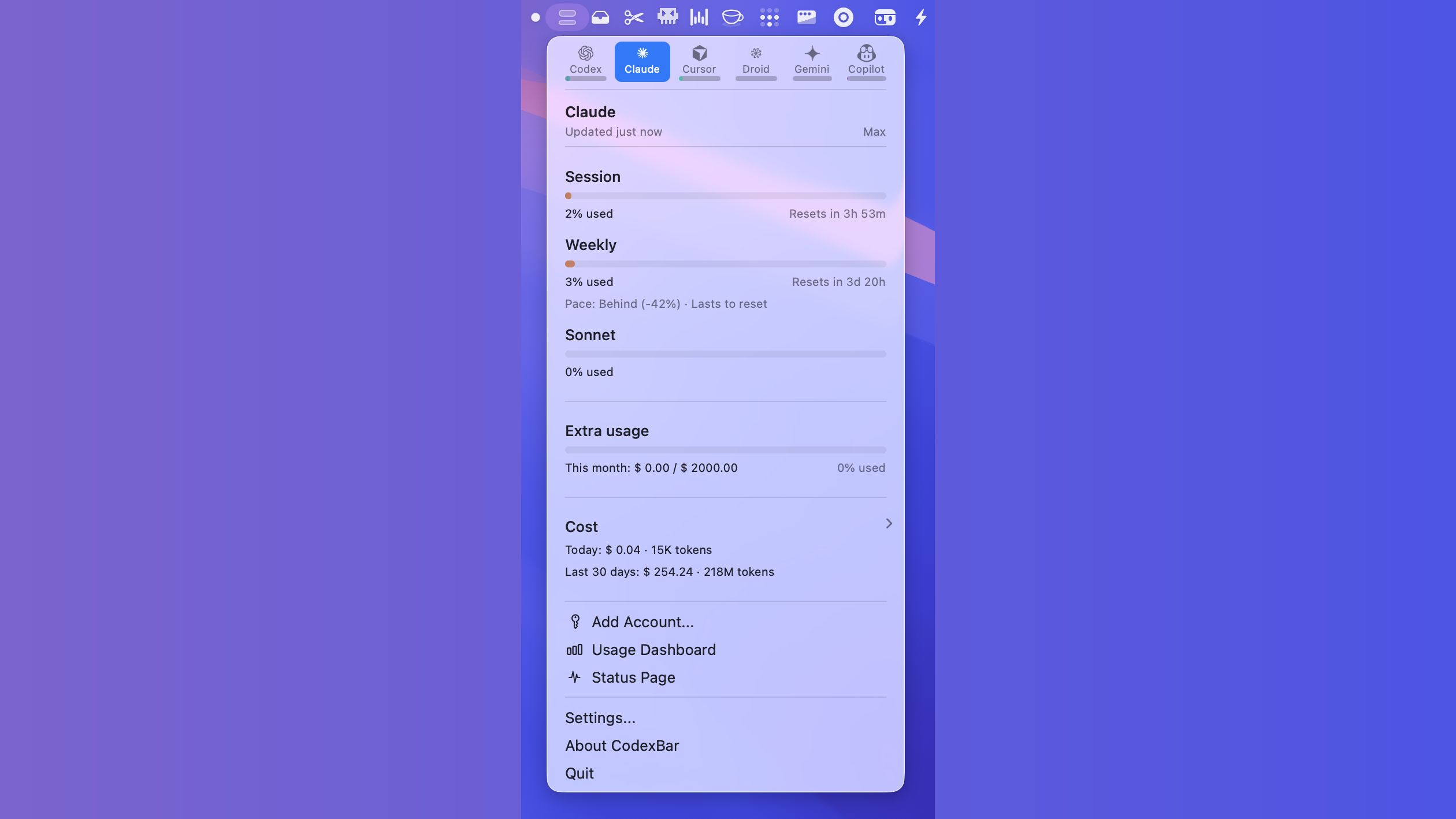
Current CodexBar features include:
- provider-specific session, weekly, and monthly usage displays where available;
- reset countdowns and optional quota warnings;
- multiple provider and account views;
- local cost-history scans for supported Claude and Codex workflows;
- status polling and incident indicators;
- a CLI for scripts and terminal output.
CodexBar is a third-party tool, not an official OpenAI or Anthropic client. Its documentation says local parsing is used by default and browser-cookie access is opt-in. Review its permissions and release notes before allowing access to account data or local logs.
Strategies That Preserve Useful Capacity
Separate Tasks Before They Grow
Do not carry an unrelated debugging history into a new feature. Start a fresh session or clear the old context. A focused conversation costs less and usually produces better decisions.
Match the Model to the Work
Use the expensive, deep-reasoning option when the task genuinely needs it. Routine edits, searches, and mechanical changes often work well with a lighter model. Reserve the strongest model for architecture, difficult debugging, and decisions where a wrong answer would be costly.
Point to Relevant Files
“Check the whole project and optimize it” has no clear stopping point. A small fix can expand into a broad cleanup. For a mobile menu bug, try a bounded request:
Fix the mobile menu failing to close. To reproduce, open the menu at a 390px viewport width, then click the backdrop. The menu should close, and desktop behavior should still work. Start with the menu component and click handlers; follow related files when necessary. Verify both interactions and report the changes and results. Leave unrelated layout work for another task.
This gives the agent a symptom, reproduction steps, expected behavior, and a starting point. Keep necessary investigation and testing; remove unrelated work. This is an example task brief, not a measured savings claim. Actual usage still depends on the model, context, and tool calls.
Ask for a Plan Before a Large Diff
A short plan can prevent a large incorrect implementation. For work spanning several files, ask the agent to identify the files, assumptions, and verification steps before editing.
Use Worktrees for Parallel Tasks
Parallel sessions that edit the same checkout can overwrite or conflict with one another. Separate substantial tasks into Git worktrees and assign each session a clear ownership boundary.
Compare the Reset Time Before Using a Banked Reset
If the automatic reset is close and the promotional reset expires much later, waiting may preserve the banked reset for a more valuable coding block. If an urgent task is blocked for hours and the reset is eligible, using it may be reasonable. Base the choice on the dashboard, not a universal rule.
Follow Product Leaders to Plan Work Before a Reset
I follow posts from OpenAI and Codex product leaders and team members on X and Reddit. When they announce an upcoming automatic usage reset, bring planned work forward to make use of the allowance you still have.
For example, if a reset is scheduled for tomorrow, move development, testing, or code reviews you already need to do into today, then start the next batch after the reset. Following these announcements gives you time to put the remaining allowance to work before it goes unused.
Out of Codex Usage: Wait, Reset, or Use Credits?
Open Settings → Usage or run /status to identify the exhausted allowance and its automatic reset time. Then ask: can the current task wait until that time?
| Your task and account situation | What to consider | Check before deciding |
|---|---|---|
| The task can wait for automatic recovery | Wait and keep your reset and credits | Whether the reset time fits your deadline |
| The task cannot wait and you have an unexpired banked reset | Redeem a reset to restore capacity | Its expiration, the old reset time, and how the new seven-day cycle fits your schedule |
| The task cannot wait, but no reset is available or you want to keep the existing weekly schedule | Check whether your account offers credits | Review the price, balance, and your budget before continuing; reschedule if paying is not worthwhile |
Consider the effect on next week’s schedule and spending as well as today’s task. A reset changes the weekly reset time. Credits pay for additional usage. Evaluate those choices separately.
Final Takeaway
Manage Codex usage with clear tasks and a workable schedule. Use advance reset announcements to plan work around your remaining allowance, and consider the new seven-day cycle and expiry date before redeeming a banked reset.
Claude Code and Codex both provide tools for checking current usage. CodexBar can make those signals easier to see, but it should complement rather than replace the official account data.


